Multimedia is any combined use of the media of communication. Multimedia literacy refers to confidence and skill in creating and understanding multimedia. |  |
 Veronica Kuhn, Associate professor at Institute for Multimedia Literacy (IML) at the University of Southern California contrasts digital literacy to traditional literacies. | Multimedia in education has affordances, or perceived uses, that vary according to the individual. It has been argued that today's younger students, the so-called 'net generation,' do not use many web-based resources as often as was formally believed or claimed. (Kennedy, et. al. 2007) Regardless, digital media is readily available to students and teachers throughout the developed world. This affords an increase in student s' autonomy, perceived or not, in many ways. For examaple, Armando R. Trindade (2003) states that teachers' roles have become "more like managers and mediators of information than as being the only source of knowledge, as they have been up to now." He argues that globalisation of multimedia texts has allowed
that will require "developing students’ capacities for managing and structuring information, for interpersonal communication and for learning by themselves" (p. 29). |
"65% of American teens [have produced their own media]. About one-third of those teens have shared the media that they have produced with a community larger than friends or family. So, there's a communication shift that's going on as more and more young people are becoming participants in their society. "Now, we didn't accept the premise that we should just take a laissez-faire attitude; that these should be feral children of the internet and that, you know, they should be raised by the rules of Web 2.0. Instead, we suggested there were basic skills and knowledge they needed to acquire... " (Jenkins, 2010, 4:11- 4:46) | This quote was taken from Henry Jenkins TED Talk on the TEDxTalks Youtube Channel. |
The unlimited classroom: If cost were no object, how would every classroom be equipped? (a personal and somewhat contentious opinion...) I've yet to work in a secondary school where calculator and keyboards have not been routinely vandalised by students, albeit with widely varying degrees of frequency. Every school I've worked in has had school policies banning mobile telephones; most have sought also to restrict access to social networking sites and video / audio streaming services due to school policy, student safety concerns and the cost of bandwidth. Nonetheless, the overall cost of technology is decreasing, and there is arguably strong pedagogical reasons to have access to Web 2.0 technologies available in the classroom. Many schools and institutions have become wary of simply grafting technology purchases onto traditional teaching practices since the benefit of doing so has proven costly and of limited educational value. Good teaching is what makes the most difference. 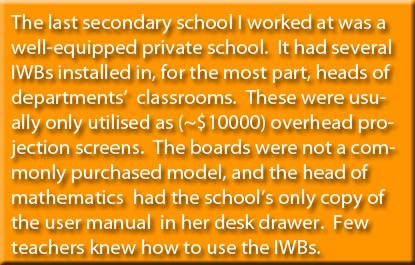 There are uses of technology that are genuinely innovative, and go beyond 'bells and whistles' in terms of educational value. I feel that the most dramatic changes in recent years have involved a shift away from single purpose instrumentation. For example, I have used an interactive white board (IWB) to great effect in a secondary science classroom, but I can now simulate most of its functionality utilising less expensive and more portable equipment.
What follows is a personal 'wish list' that includes contentious use of technology, such as the presence of a high speed broadband service provisioned over a wireless network, and use of smart device applets, such as those available on the iPod Touch. Please use the interactive mindmap below for a personal view on use of ICT in the classroom.
| Multimedia in education: Here are some links to examples of uses of multimedia. You will need to use your browser's 'back' button to return to this page.


|

The best use of technology, for me, would keep classroom equipment both simple and as multifunctional as possible. Both secondary and tertiary classrooms should be equipped with or have access to:
Every teacher should also have access to
|
2. What is Multimedia? A
| to do: fix the links so they open in a different target page. finish references spell check banner
|
Jenkins, H. (2010, June 13). TEDxNYED - Henry Jenkins - 13/06/10 [Video file]. Retrieved from http://www.youtube.com/watch?v=AFCLKa0XRlw
Noun: Multimedia vs multimodal
MAYBE: Some form of taxonomy arguably required to classify and evaluate multimedia from an educational perspective: pedagogy and T-Mum, work of Heller that includes receivers as well as the presentation...multimedia does not exist in a vacuum.
examples include a trivial illustration that is brought to relevance through altering reference to it... also an example that is merely decorative outside the context of the culture of the group the material is prepared for. How are symbolic representations used...illustration as metaphor? Aspects of good teaching, such as introducing humour, etc.
References:
Mack, C. (2005). Looking at the Renaissance: Essays toward a conceptual appreciation. London: Taylor &
Francis.
T-Mum no longer on the web, but available here:
